

Platform overview
Every menu in Elitea shares the same shell: a sidebar for navigation, a project selector, and a consistent set of list, search, and organization controls. This page covers what is common; each menu’s own page covers what is specific to it.
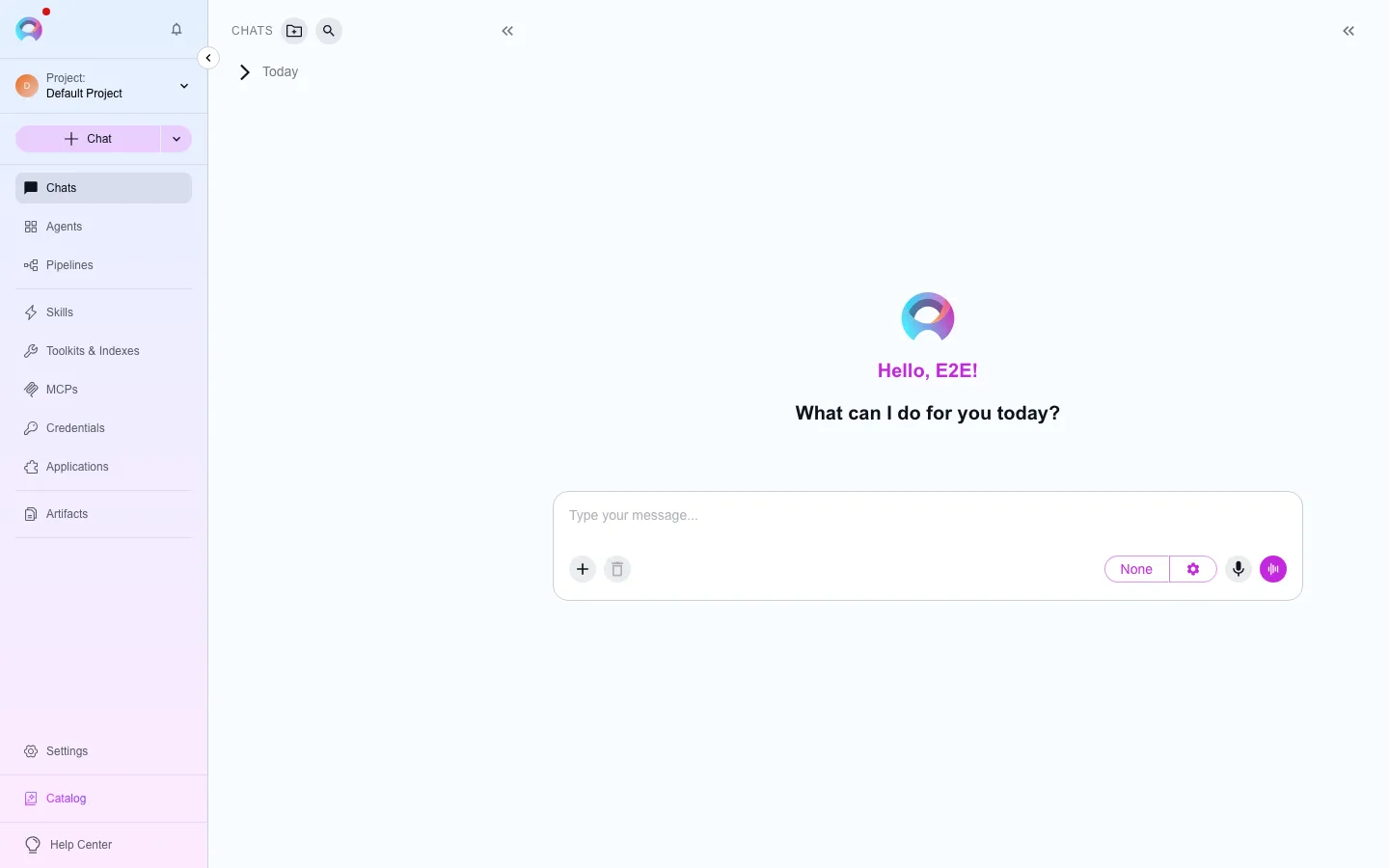
Sidebar
Section titled “Sidebar”The sidebar is the same in the browser and in the desktop app. From the top:
- Header — the Elitea logo, the notification bell, and the button that collapses the sidebar (in the desktop app, the bell sits in the title bar beside Hide sidebar).
- Project selector — everything below it belongs to the selected project.
- Chats — your conversations: Pinned, your folders, then the date groups (Today, Yesterday, Previous 7 days, …), and an Archived row at the end. The Chats caption has buttons to search the chats, create a folder, start a new chat, and show or hide the list. In the browser, its ⋯ menu has a Local work only filter.
- Applications and Artifacts, then Workshop — a group you open to reach Agents, Pipelines, Skills, Toolkits & Indexes, and MCPs.
- Your account at the bottom: your picture and name open the account menu. When the deployment has a support assistant, the Support Bot bar is under it.
Account menu
Section titled “Account menu”The account menu is the same in the browser and in the desktop app. Select your picture and name at the bottom of the sidebar, or your picture alone when the sidebar is collapsed. The menu opens upward. From the top:
- Your email address.
- Settings, Usage (when the deployment tracks costs), Credentials (when you may open them), and the Catalog.
- Admin portal, only when your account holds an administration permission. In the browser it opens the admin console in the same tab; Ctrl-click or ⌘-click opens a new tab. The desktop app opens it in your web browser, where the console uses your browser session.
- Appearance (System, Light or Dark) and Language.
- Get help (the Help Center) and What’s new. The desktop app also has Troubleshoot, and a bug report button beside your name.
- The version line, for example Version 1.72.3 · Server 1.72: the version of the app you are using, and the version of the server. Select it to copy it, for example for a support request. A local or development build reads dev.
- Sign out, always last.
Press Esc to close the menu; the focus goes back to your name.
Creating from the sidebar
Section titled “Creating from the sidebar”Each place you can add to has a + at the end of its row — New agent, New pipeline, New skill, New toolkit, New MCP, New application (opens the catalog), and New bucket. The + appears when you point at the row or move to it with the keyboard. The + in the Chats caption starts a new chat. A + is left out when you don’t have permission to create that item in the selected project, and in the public project when you have no personal project. Each list page also has its own New button.
Collapsed sidebar
Section titled “Collapsed sidebar”Collapse the sidebar to keep only an icon for each place and a single + that starts a new chat. Point at an icon to see its name. The chat list is hidden until you expand the sidebar again. Your picture stays at the bottom and opens the same account menu.
Project selector
Section titled “Project selector”Use the project selector at the top of the sidebar to switch between your personal project — visible only to you — and any team projects you belong to, where entities are shared and collaboratively managed according to each member’s role.
Common list controls
Section titled “Common list controls”Most menus (Agents, Pipelines, Skills, Toolkits, Credentials) share the same dashboard pattern:
- Card view and table view, toggled from the top of the list.
- A search box scoped to the current menu — search does not span menus.
- Tag filters to narrow the list by category.
- Pinning — pin an item to keep it at the top of its list.
- Sorting (table view) by name, created date, type, or author.
What’s next
Section titled “What’s next”Start with the menu you need:
Chat
Agents
Pipelines
Skills
Toolkits
Applications
Credentials
Artifacts
Catalog