

Elitea MCP server
Elitea is itself an MCP server: any client that speaks the Model Context Protocol can call your tagged agents, pipelines and toolkit tools as MCP tools. The transport is streamable HTTP — a single POST endpoint that answers initialize, tools/list and tools/call. There is no SSE stream and no stdio server: a GET on the endpoint answers “The server does not offer an SSE stream at this endpoint.”
Prerequisites
Section titled “Prerequisites”- Your project’s MCP endpoint:
https://<your-elitea-host>/app/<projectID>/mcp. Find the project ID in the project switcher or in the address bar of the app. - A personal access token. Send it as
Authorization: Bearer <token>. See Create a token. - Membership in the project. The server authenticates every request as the token owner. A token owner who is not a member of
<projectID>gets403 forbidden. - At least one agent or pipeline tagged
mcp, or a toolkit with tools marked “available by MCP” (see Make tools available by MCP). Otherwisetools/listreturns an empty list. An empty list is a correct answer. - MCP exposure on the deployment. An administrator can turn it off. Then every request gets
403with “MCP exposure is disabled on this deployment”.
Create a token
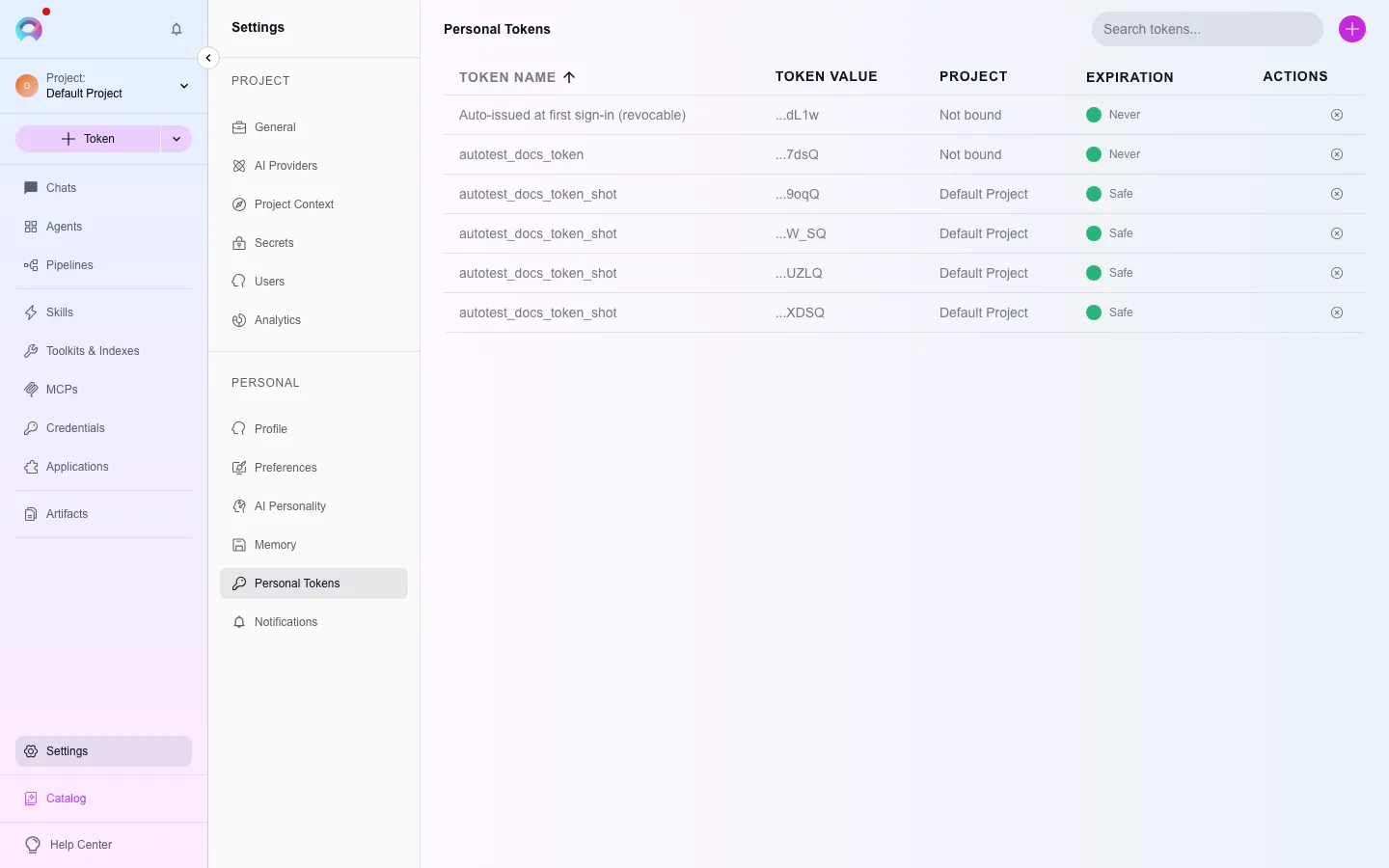
Section titled “Create a token”Open Personal tokens
Go to Settings → Personal tokens (
/settings/tokens).Generate the token
Click +. Give the token a name, for example
mcp-claude-code. Set an expiration date. Click Generate.Copy the token
Copy the value immediately. The dialog shows it only once. For more detail, see Create a personal access token.
Tag an agent or pipeline for MCP
Section titled “Tag an agent or pipeline for MCP”Open the agent or pipeline
Open the agent or pipeline you want to expose.
Add the mcp tag
Add the tag
mcpto it. Elitea exposes one tool per tagged agent/pipeline, taking a single free-formtaskstring as input.Pick which version is served
If the agent has several tagged versions, the newest tagged one is the one served — not necessarily the version marked “latest” in the UI. Retag or delete older tagged versions if you need a specific one served.
Connect a client
Section titled “Connect a client”The server speaks the streamable HTTP transport only. Every client below sends POST requests to the endpoint with a static Authorization header.
Run this command once:
claude mcp add --transport http elitea \ https://<your-elitea-host>/app/<projectID>/mcp \ --header "Authorization: Bearer <your-token>"Add --scope user to make the server available in all your projects. Run claude mcp list to make sure that the server connects. In a session, type /mcp to see the Elitea tools.
Add a server entry to .cursor/mcp.json (project) or ~/.cursor/mcp.json (global):
{ "mcpServers": { "elitea": { "type": "http", "url": "https://<your-elitea-host>/app/<projectID>/mcp", "headers": { "Authorization": "Bearer <your-token>" } } }}Open Cursor Settings → MCP and make sure that the elitea server shows a green status and its tools.
Add a server entry to .vscode/mcp.json (workspace) or your user mcp.json (global):
{ "servers": { "elitea": { "type": "http", "url": "https://<your-elitea-host>/app/<projectID>/mcp", "headers": { "Authorization": "Bearer <your-token>" } } }}Reload the MCP server list. Then select tools from your Elitea project in Copilot Chat’s Agent mode.
Claude Desktop custom connectors do not send a static Authorization header. Use the mcp-remote bridge. The bridge runs locally, adds the header, and forwards each request to Elitea. It needs Node.js 18 or later.
Open Settings → Developer → Edit Config. Add this entry to claude_desktop_config.json:
{ "mcpServers": { "elitea": { "command": "npx", "args": [ "-y", "mcp-remote", "https://<your-elitea-host>/app/<projectID>/mcp", "--transport", "http-only", "--header", "Authorization:${ELITEA_AUTH}" ], "env": { "ELITEA_AUTH": "Bearer <your-token>" } } }}Restart Claude Desktop. The header value is in env because some platforms split an argument that contains a space. --transport http-only stops the bridge from a retry with the older SSE transport, which this server does not support.
sequenceDiagram
    participant Client as MCP client (Claude Code, Cursor, VS Code, Claude Desktop)
    participant Elitea as Elitea MCP server
    Client->>Elitea: initialize
    Elitea-->>Client: capabilities
    Client->>Elitea: tools/list
    Elitea-->>Client: tagged agents/pipelines + flagged toolkit tools
    Client->>Elitea: tools/call (task or tool args)
    Elitea-->>Client: result
Common issues
Section titled “Common issues”| Response | Cause | Action |
|---|---|---|
401 unauthorized | The token is missing, expired or revoked. | Create a new token and update the client configuration. |
403 forbidden | The token owner is not a member of the project. | Ask a project administrator to add you, or use a project ID that you are a member of. |
403 “MCP exposure is disabled on this deployment” | An administrator turned off MCP exposure. | Ask the administrator to turn it on. |
405 “The server does not offer an SSE stream at this endpoint” | The client sent GET to open an SSE stream. | Configure the client for the HTTP transport, not SSE. |
Empty tools/list | No agent or pipeline has the mcp tag, and no toolkit tool is available by MCP. | Add the mcp tag, as in Tag an agent or pipeline for MCP. |