

Make toolkit tools available by MCP
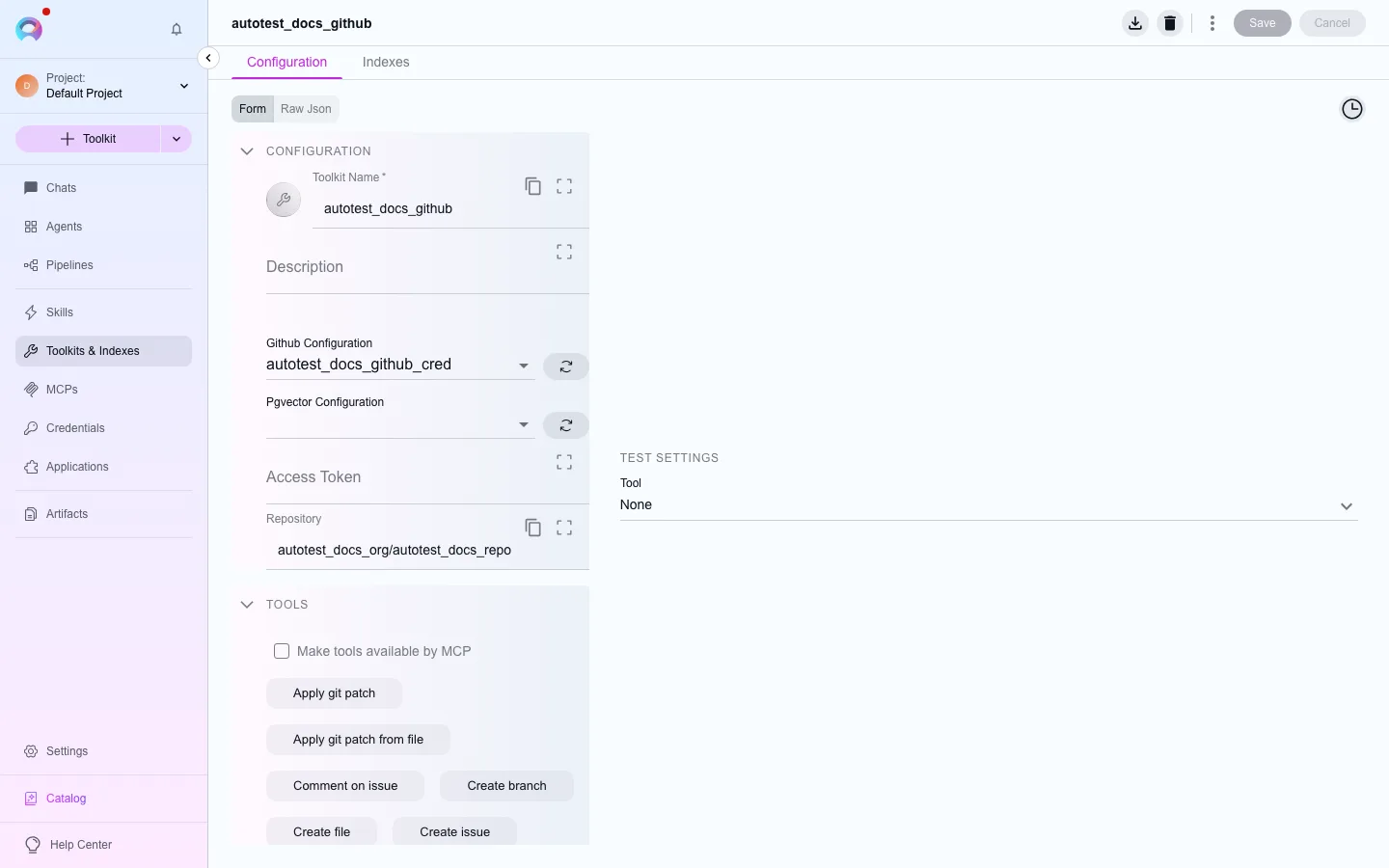
Agents and pipelines reach MCP clients through a tag, but toolkit tools reach them through a per-toolkit checkbox: Make tools available by MCP, in the toolkit editor’s Tools section. Only the tools you’ve selected on a flagged toolkit are published; nothing is exposed by default.
Expose a toolkit’s tools
Section titled “Expose a toolkit’s tools”Open the toolkit
Open an existing toolkit (or create one — see the toolkit’s own page under Toolkits), and go to its Tools tab.
Select the tools to expose
Choose which of the toolkit’s tools should be callable at all (the same selection agents and pipelines use).
Enable Make tools available by MCP
Check Make tools available by MCP. Elitea publishes one MCP tool per selected tool, named
<toolkit>_<tool>(for examplegithub_create_issue).Save
Select Save. The client’s next
tools/listcall picks up the change — reconnect the client if it caches the tool list for the session.
How a call runs
Section titled “How a call runs”A tools/call for a published toolkit tool dispatches through the same run path chat uses — with idempotency and polling for the worker’s result — not a stub. It still needs the toolkit’s own prerequisites: the right worker for that toolkit type, and a working credential.